앞서 PostgreSQL logical structure에 대해 알아봤습니다.
1. PostgreSQL internal - logical structure
database clusterPostgreSQL에서 database cluster의 의미는 일반적으로 알려진 의미와 다릅니다. cluster의 일반적 의미 여러 DB 서버가 하나의 group을 이룬다는 의미로 사용 스토리지를 공유하는 클러
lsmdd.tistory.com
이번에는 physical structure을 알아보겠습니다.
physical structure
PostgreSQL의 database cluster는 initdb 시 지정한 디렉토리 밑으로 물리적 파일이 생성됩니다.
initdb 시 지정한 디렉토리를 $PGDATA 환경변수에 설정할 수 있습니다.
$PGDATA 밑에 생성된 database 관련 디렉토리인 base가 생성됩니다.
그리고 base 디렉토리 밑에 각각의 database oid로 만들어진 디렉토리 하위에 table 및 index 관련 파일들이 생성되게 됩니다.
그외 여러 개의 디렉토리가 생성되는데 자세한 내용이 궁금하면 PostgreSQL 공식 문서를 참고할 것.

실제 서버에서 조회 - database
tree --dirsfirst -L 1
.
├── base
├── global
├── pg_commit_ts
├── pg_dynshmem
├── pg_logical
├── pg_multixact
├── pg_notify
├── pg_replslot
├── pg_serial
├── pg_snapshots
├── pg_stat
├── pg_stat_tmp
├── pg_subtrans
├── pg_tblspc
├── pg_twophase
├── pg_wal
├── pg_xact
├── backup_label.old
├── current_logfiles
├── pg_hba.conf
├── pg_ident.conf
├── PG_VERSION
├── postgresql.conf
├── postmaster.opts
├── postmaster.pid
├── standby.signal
└── startup.log

psql -d postgres -qc "select oid, datname, datdba from pg_database"
  oid  |  datname  | datdba
-------+-----------+--------
     1 | template1 |     10
 14173 | template0 |     10
 14174 | postgres  |     10
 41179 | testdb    |  41178

#### database인 testdb oid(41179)로 directory가 생성된걸 확인할 수 있음.
ls base/41179/
112        14043     2608      2653  2690      2995      3466      3607      4166
113        1417      2608_fsm  2654  2691      2996      3467      3608      4167
1247       1418      2608_vm   2655  2692      3079      3468      3609      4168
1247_fsm   174       2609      2656  2693      3079_fsm  3501      3712      4169
1247_vm    175       2609_fsm  2657  2696      3079_vm   3502      3764      4170
실제 서버에서 조회 - table and index
인덱스와 테이블의 하나의 file당 크기는 최대 1GB보다 작아야 함.
| 중요! table과 index가 생성될 때 생성된 파일의 최대 크기는 PostgreSQL build 시 옵션으로 사용되는 --with-segsize(default 1GB) 옵션에 의해 결정됨. |
table과 index의 경우 physical file을 찾을 때 oid를 보는게 아니라 relfilenode 값을 확인해야 함.
| table과 index에서 relfilenode 값을 확인해야하는 이유 TRUNCATE, REINDEX, CLUSTER와 같은 명령을 사용하게 되면 relfilenode 값이 변경됨. |
table이 생성되면 relfilenode에 해당하는 물리적 파일이 생성됨.
table이 생성되고 데이터가 인입되면 relfilenode_fsm 파일이 생성됨.
table에 vacuum이 수행되면 relfilenode_vm 파일이 생성됨.
index가 생성되면 relfilenode에 해당하는 물리적 파일이 생성됨.
index의 경우엔 table과 달리 relfilenode_fsm만 생성됨.
FSM과 VM의 의미는 나중에 자세히 알아보도록 하고 간단하게 적어본다.
| FSM(Free Space Map)의 사용 table은 page(=block)로 구성되는데 각 page내 사용가능한 공간이 얼마나 있는지를 FSM에 저장해서 관리함. VM(Visibiliry Map) page내 저장된 dead tuple 존재 유무를 확인하거나 wrapaound 방지를 위해 freeze해야할 XID가 있는지 확인하기 위해 사용 FSM과 VM 모두 모든 page내 tuple을 scan하는 비효율을줄이고자 사용함. |
간단테스트 진행
drop table test_table0;
create table test_table0(num serial, num2 int, aa timestamp , bb text, cc text);

$ psql -d testdb -qc "SELECT relname, oid, relfilenode FROM pg_class WHERE relname = 'test_table0'"
   relname   |  oid  | relfilenode
-------------+-------+-------------
 test_table0 | 74132 |       74132

$ psql -d testdb -qc "SELECT pg_relation_filepath('test_table0')"
 pg_relation_filepath
----------------------
 base/41179/74132

#### 테이블이 생성되면 table oid에 해당하는 파일이 생김.
ls -al $PGDATA/base/41179 | grep 74132
-rw------- 1 postgres postgres      0 Dec 15 18:39 74132


$ psql -d testdb -U testappo

insert into test_table0 (num2,aa, bb,cc)
select
    i,
    now(),
    md5(random()::text),
    md5(random()::text)
from generate_series(1, 999) s(i);

#### 데이터가 인입되면 Free Space Map이 생김
ls -al $PGDATA/base/41179 | grep 74132
-rw------- 1 postgres postgres 122880 Dec 15 18:40 74132
-rw------- 1 postgres postgres  24576 Dec 15 18:40 74132_fsm


#### vacuum이 수행되면 Visibiliry Map이 생김
psql -d testdb -U testappo -qc "vacuum test_table0"

$ ls -al $PGDATA/base/41179 | grep 74132
-rw------- 1 postgres postgres 122880 Dec 15 18:41 74132
-rw------- 1 postgres postgres  24576 Dec 15 18:41 74132_fsm
-rw------- 1 postgres postgres   8192 Dec 15 18:43 74132_vm

#### 인덱스 생성 후 확인
psql -d testdb -U testappo -qc "create index idx01_num2 on test_table0(num2)"

psql -d testdb -qc "SELECT relname, oid, relfilenode FROM pg_class WHERE relname = 'idx01_num2'"

  relname   |  oid  | relfilenode
------------+-------+-------------
 idx01_num2 | 74141 |       74141

ls -al $PGDATA/base/41179 | grep 74141
-rw------- 1 postgres postgres  40960 Dec 15 18:46 74141


#### truncate 시 relfilenode id 변경 확인
$ psql -d testdb -qc "SELECT relname, oid, relfilenode FROM pg_class WHERE relname = 'test_table0'"
   relname   |  oid  | relfilenode
-------------+-------+-------------
 test_table0 | 74132 |       74132

 $ ls -al $PGDATA/base/41179 | grep 74132 | wc -l
 3

 $ psql -d testdb -qc "truncate table test_table0"

 $ psql -d testdb -qc "SELECT relname, oid, relfilenode FROM pg_class WHERE relname = 'test_table0'"
   relname   |  oid  | relfilenode
-------------+-------+-------------
 test_table0 | 74132 |       74144


 ls -al $PGDATA/base/41179 | grep 74132
-rw------- 1 postgres postgres      0 Dec 15 19:48 74132

ls -al $PGDATA/base/41179 | grep 74144
-rw------- 1 postgres postgres      0 Dec 15 19:48 74144

#### vacuum analyze 수행
$ psql -d testdb -U testappo -qc "vacuum analyze test_table0"

#### FSM, VM 생성 확인
$ ls -al $PGDATA/base/41179 | grep 74144
-rw------- 1 postgres postgres   8192 Dec 15 19:49 74144
-rw------- 1 postgres postgres  24576 Dec 15 19:50 74144_fsm
-rw------- 1 postgres postgres   8192 Dec 15 19:50 74144_vm
Tablespaces
tablespace는 ORACLE을 운영해본 분들이라면 친숙하시겠지만 PostgreSQL의 tablespaces의 의미는 다릅니다.
| 참고: ORACLE에서 tablespaces의 의미 하나 또는 여러개의 데이터 파일로 구성되어 있는 논리적인 데이터 저장구조 |
initdb시 생성한 $PGDATA영역이 아닌 다른 외부의 공간에 데이터 파일을 생성하기 위해 사용함.
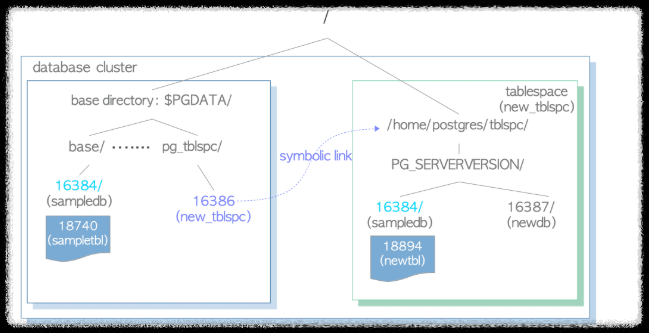
간단테스트
#### tablespace 디렉토리 생성
mkdir -p /home1/postgres/tblspc

ls -al /home1/postgres | grep tblspc
drwxr-xr-x  2 postgres postgres  4096 Dec 15 20:00 tblspc


#### tablepsace 생성 및 확인
psql -d testdb -U postgres -c "CREATE TABLESPACE testspace LOCATION '/home1/postgres/tblspc'"

$ psql -d testdb -U postgres -c "select oid,spcname from pg_tablespace where oid = 74148"
  oid  |  spcname
-------+-----------
 74148 | testspace

ls -al $PGDATA/pg_tblspc
lrwxrwxrwx  1 postgres postgres   22 Dec 15 20:04 74148 -> /home1/postgres/tblspc


ls -al /home1/postgres/tblspc
drwx------  2 postgres postgres 4096 Dec 15 20:04 PG_13_202007201


#### 생성한 tablespace밑으로 파일 생성여부 테스트
psql -d testdb -U postgres -c "drop table test_table1"

psql -d testdb -U postgres -c "create table test_table1(num serial, num2 int, aa timestamp , bb text, cc text) tablespace testspace"

psql -d testdb -U postgres -c "SELECT pg_relation_filepath('test_table1')"
            pg_relation_filepath
---------------------------------------------
 pg_tblspc/74148/PG_13_202007201/41179/74153


#### 외부 디렉토리에 생성 확인
$ ls -al /home1/postgres/tblspc/PG_13_202007201/41179/74153 | wc -ㅣ
1
HA 구성 상태에서 tablespace 생성 시 유의점
secondary가 있다면 tablespace를 create하기 전에 모든 node에서 디렉토리를 생성해줘야 함.
그렇지 않을 경우 HA구성이 깨짐.
pg_autoctl show state
              Name |  Node |               Host:Port |       TLI: LSN |   Connection |      Reported State |      Assigned State
-------------------+-------+-------------------------+----------------+--------------+---------------------+--------------------
test1 |     1 | test1:6432 |  20: 2/325B6F0 |  read-only ! |          catchingup |          catchingup
test2 |     2 | test2:6432 |  20: 2/3288258 |   read-write |        wait_primary |        wait_primary


#### secondary 에러 로그
[2024-12-16 10:47:36 KST]-156846 LOG:  consistent recovery state reached at 2/325B6F0
[2024-12-16 10:47:36 KST]-156846 FATAL:  directory "/home1/postgres/tblspc" does not exist
[2024-12-16 10:47:36 KST]-156846 HINT:  Create this directory for the tablespace before restarting the server.
[2024-12-16 10:47:36 KST]-156846 CONTEXT:  WAL redo at 2/325BA08 for Tablespace/CREATE: 74148 "/home1/postgres/tblspc"
[2024-12-16 10:47:36 KST]-156844 LOG:  database system is ready to accept read only connections
[2024-12-16 10:47:36 KST]-156844 LOG:  startup process (PID 156846) exited with exit code 1
[2024-12-16 10:47:36 KST]-156844 LOG:  terminating any other active server processes
[2024-12-16 10:47:36 KST]-156844 LOG: database system is shut down'PostgreSQL' 카테고리의 다른 글
| 06. PostgreSQL - MVCC 개념 (4) | 2024.12.17 |
|---|---|
| 04. PostgreSQL - tuple을 읽고 쓰는 방법 (4) | 2024.12.15 |
| 3. PostgreSQL - heap table file layout (5) | 2024.12.15 |
| 0. postgreSQL internal (1) | 2024.12.15 |
| 1. PostgreSQL internal - logical structure (2) | 2024.12.15 |


